Designing Scalable IoT Systems: A Comprehensive Architecture Guide
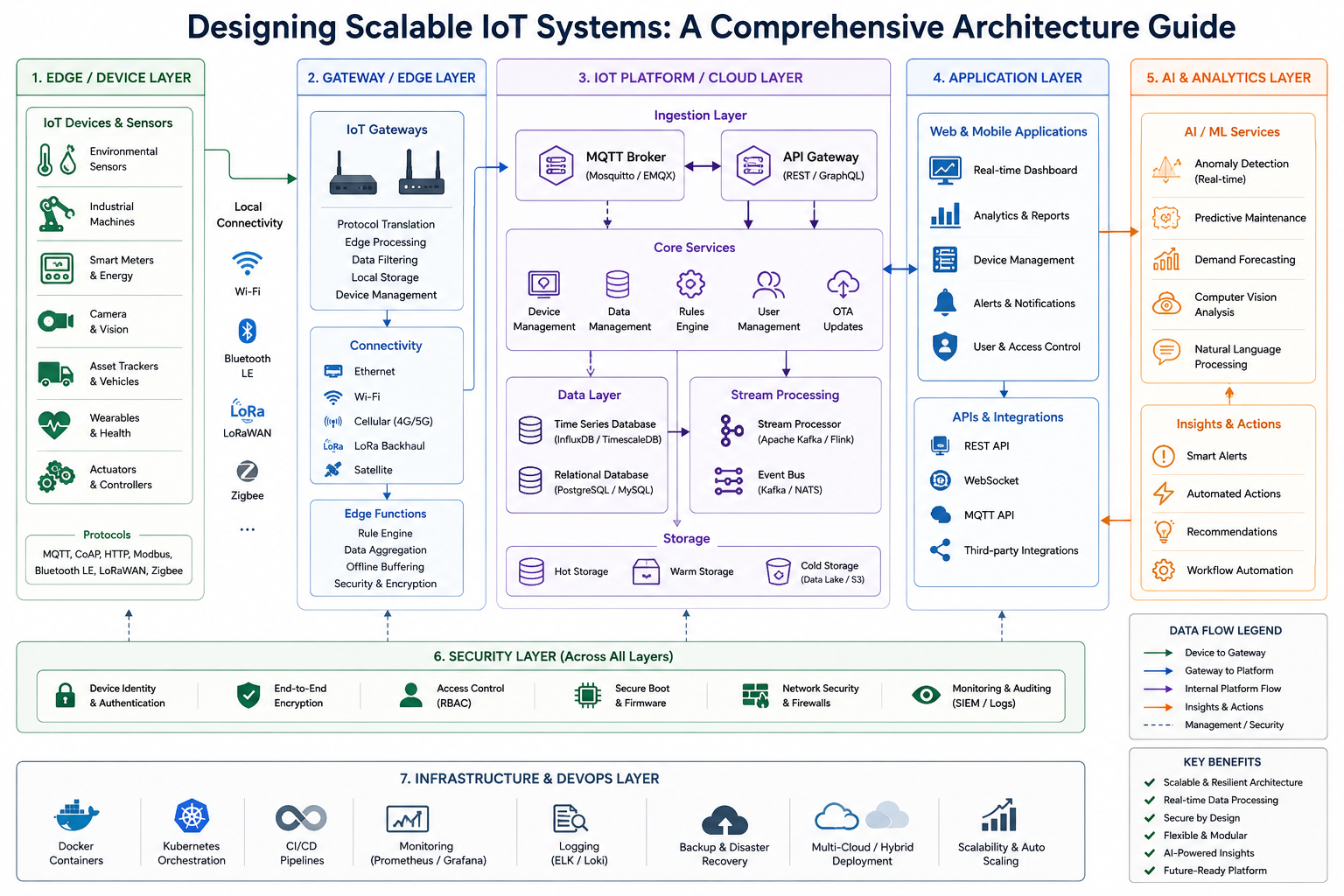
Designing Scalable IoT Systems
Part 1: Introduction
1.1 The IoT Landscape Today
Overview: Modern industry and smart environments generate massive amounts of data from machines, sensors, and systems—too much for people to track manually. This creates both a challenge and an opportunity for system integrators.
Key Questions:
- How do we collect, process, and act on data from hundreds or thousands of devices?
- What architectural choices enable scalability, reliability, and cost-effectiveness?
- How can AI transform raw data into actionable intelligence?
Real-World Context: Applications range from agriculture and smart buildings to industrial automation and environmental monitoring. Each domain has unique requirements for power consumption, communication range, and data frequency.
1.2 The Integrator’s Perspective
Target Audience: This article is written for IoT system integrators, developers, and solution architects who need to make informed decisions about technology stacks, deployment models, and system design.
Portfolio Value: Understanding these architectural trade-offs demonstrates the ability to design complete, production-ready IoT solutions—a critical skill for professional integrators.
Part 2: Architectural Foundations
2.1 Open vs. Closed Controller Systems
Blog Link: Choosing Between Open and Closed IoT Architectures
Open Architectures
- Definition: Systems built with widely available, commodity microcontrollers (ESP32, STM32, Raspberry Pi) and open-source software
- Advantages:
- Flexibility and customization
- Cost-effectiveness
- Large community support
- No vendor lock-in
- Disadvantages:
- Greater responsibility for security and integration
- More complex maintenance
- Requires technical expertise
Closed (Proprietary) Systems
- Definition: Tightly integrated hardware-software stacks from a single vendor
- Advantages:
- “No-code” configuration
- Simplified deployment
- Vendor-managed security updates
- Disadvantages:
- Vendor lock-in
- Limited customization
- Higher long-term costs
The SaaS Model Opportunity
Key Insight: Open architectures enable a “SaaS-like” business model. An integrator can build a server infrastructure—deployable via Docker containers—and offer it as a service to clients. Clients can run the entire platform on their own hardware, maintaining data control while benefiting from professional-grade IoT management.
Examples:
- N3xar platform: Provides cloud storage, real-time dashboards, and alerts without requiring users to build their own backend
- Self-hosted Docker deployments for enterprise clients
2.2 Smart Nodes & Simple Server vs. Dumb Nodes & Smart Server
Smart Nodes + Simple Server (Distributed Intelligence)
- Definition: Each node processes data locally and makes independent decisions
- Best For:
- Weak internet connections
- Unstable power supplies
- Remote or off-grid locations
- Advantages:
- Operates autonomously
- Local data processing
- Store-and-forward capability
- Disadvantages:
- Potential for system-wide chaos with many nodes
- Difficult to orchestrate
- Complex firmware updates
Dumb Nodes + Smart Server (Centralized Orchestration)
- Definition: Nodes are simple sensors/actuators; all logic resides on the server
- Best For:
- Stable network conditions
- Continuous power supply
- Large-scale deployments
- Advantages:
- Easy to scale
- Simple to add/remove nodes
- Centralized AI analysis
- Consistent system behavior
- Disadvantages:
- Single point of failure
- Dependent on network connectivity
Real-World Example: N3xar uses a hybrid approach—low-power autonomous nodes for long-term sensor use and powered nodes for sensors and actuators. The platform supports both modes, allowing flexibility based on deployment needs.
Part 3: Device & Connectivity Choices
3.1 Controller Selection Guide
Blog Link: Comparing IoT Controllers for Your Project
Microcontroller Comparison
| Controller | Processing | Connectivity | Power Consumption | Best Use Case |
|---|---|---|---|---|
| ESP8266 | Single-core @ 80MHz | Wi-Fi | Moderate | Low-cost Wi-Fi sensors |
| ESP32 | Dual-core @ 240MHz | Wi-Fi, Bluetooth | Moderate | Wi-Fi sensors, gateways, complex control |
| STM32 | Single/dual-core (Cortex-M) | External (SPI/UART/I2C) | Very Low (<2µA sleep) | Battery-powered sensors, industrial |
| RP2040 | Dual-core @ 133MHz | External | Low | Cost-sensitive, high-performance embedded |
| Raspberry Pi | Multi-core CPU | Ethernet, Wi-Fi, BT | High | Gateways, edge AI, complex applications |
| Particle Photon 2 | ARM Cortex-M33 | Wi-Fi, BLE | Moderate | Cloud-connected IoT |
Key Considerations:
- Processing Power: Dual-core controllers (ESP32, RP2040) enable parallel tasks—Wi-Fi stack on one core, application logic on the other
- Memory: Flash and RAM determine firmware complexity and OTA update capability
- Peripherals: I²C, SPI, UART, ADC, PWM for sensor and actuator interfacing
3.2 Communication Protocols
Blog Link: Overview of Wireless Communication Protocols for IoT
Wi-Fi (IEEE 802.11)
- Range: 30-100m indoor, 100-200m outdoor
- Data Rate: 54 Mbps to 9 Gbps
- Power Consumption: High—challenging for battery-powered devices
- Node Limitations: 10-200+ devices per access point
- Best For: High-bandwidth applications with constant power
- Controllers: ESP8266, ESP32, Raspberry Pi Pico W
LoRa/LoRaWAN
- Range: Up to 10 km open space (line-of-sight)
- Data Rate: Low (ideal for small, infrequent packets)
- Power Consumption: Very low—up to 2 years battery life
- Node Capacity: Up to 2,000 nodes per network
- Best For: Long-range, low-power applications
- Requirement: LoRa gateway to relay data to cloud
Cellular (2G/3G/4G/5G)
- Range: Wide-area (network dependent)
- Data Rate: Medium to high
- Power Consumption: Moderate to high
- Best For: Mobile assets, remote locations without other infrastructure
Bluetooth Low Energy (BLE)
- Range: Short (10-100m)
- Data Rate: Low to medium
- Power Consumption: Very low
- Best For: Personal devices, wearables, proximity sensing
Ethernet (Wired)
- Range: Up to 100m (per segment)
- Data Rate: High (10/100/1000 Mbps)
- Power Consumption: Moderate (PoE available)
- Best For: Gateways, servers, fixed installations
3.3 Power Consumption Deep Dive
Blog Link: Ultra-Low-Power IoT: Achieving <1µA Sleep Current
The Consumption Challenge
Key Insight: Low-power controllers are only part of the solution—not all sensors support low-power modes. A sensor that draws 5mA during measurement may be acceptable, but one that draws 1mA continuously will drain batteries quickly.
Real-World Example: STM32 Ultra-Low Power
- Sleep Mode: <2µA
- Active Mode: ~100µA/MHz
- Application: Battery-powered sensors running for 2+ years on a single AA battery
N3xar’s Approach
The platform supports both AC-powered and ultra-efficient sleep-mode devices (<1µA). Key products include:
- Ethernet, wired, Wi-Fi & LoRa devices
- I²C, motion, water, and contact sensors
- Electromechanical actuators & valves
- Stepper/servo motor control boards
3.4 Device Ecosystem
Blog Link: Building a Complete IoT Device Ecosystem
Supported Device Types (N3xar Example)
- Simple controllers and sensor modules
- Video cameras and DVR systems
- Security systems and access controls
- Computers, servers, VPS, and virtual environments
- Industrial and specialized machinery
Measurement Capabilities
- Environmental: Temperature, humidity, pressure, light, dust, noise, motion, gyroscopes, speed
- Digital Inputs: Dry contacts, actuator statuses
- Software Sensors: CPU/memory usage, network connectivity, service health, container diagnostics
Part 4: Node Communication & Network Protocols
Blog Link: IoT Network Design: From Nodes to Cloud
4.1 Data Transmission Fundamentals
Key Parameters
- Nodes → Gateway → Server: Standard data flow architecture
- Quantity of Nodes: Determines network capacity requirements
- Transmission Time Period: Affects collision probability and power consumption
- TX Speed/Data Rate: Trade-off between speed and range/reliability
- Important Message Loss: Critical for alarm and control messages
Collision Problem
When multiple nodes transmit simultaneously:
- Data packets collide and are lost
- Retransmissions increase power consumption
- Network capacity is reduced
4.2 Transmission Strategies
Simple Mode: Chaotic TX Period
- Implementation: Each node uses random or odd-numbered time delays
- Advantages:
- Simple to implement
- No need for receiving synchronization signals
- Disadvantages:
- High collision probability
- Important messages may be lost
- Unpredictable network behavior
Synchronized Transmission
- Implementation: A central signal synchronizes all node transmission times
- Advantages:
- Each node knows exact TX time
- Low collision probability
- Predictable network behavior
- Disadvantages:
- Requires RX capability for synchronization
- Nodes depend on sync signal timing
- Frequent TX = easy sync but more dead time
Real-World Solution: N3xar’s SyncMaster (Time Coordinator) synchronizes transmission timing across all nodes to reduce signal collisions and optimize airtime usage.
4.3 Protocol Comparison: LoRa vs. Wi-Fi
LoRa Networks
- Advantages:
- Long range (up to 10 km)
- Low power consumption
- High node capacity (2,000+ nodes)
- Unlicensed frequency bands
- Disadvantages:
- Low data rate
- Many devices increase transmission time
- Requires gateway
Wi-Fi Networks
Option 1: Router-Mediated
- Advantages:
- No dedicated gateway needed
- High data rates
- Existing infrastructure
- Disadvantages:
- Limited range (30-100m indoor)
- Node limit (10-200+ per router)
- Connection stability issues
- Router change requires reconfiguration of every node
Option 2: Direct Connection (Access Point Mode)
- Advantages:
- No limit on node quantity
- High-speed interaction
- Local group + gateway architecture
- Disadvantages:
- Requires gateway (Wi-Fi, LoRa, cellular, or other medium)
- More complex setup
4.4 Protocol Features
Critical Features for IoT Nodes:
- Automatic restart when internet connection is lost
- Store-and-forward for offline periods
- Over-the-air (OTA) firmware updates
- Quality of Service (QoS) levels for message delivery
Part 5: Server & Cloud Architecture
Blog Link: IoT Backend Architectures: From Prototype to Production” and “Dockerizing Your IoT Stack
5.1 Deployment Models
1. SaaS (Software as a Service)
- What it is: Using a fully managed platform (AWS IoT Core, Azure IoT Hub, Datacake, etc.)
- Advantages:
- No infrastructure management
- Rapid deployment
- Scalability on demand
- Disadvantages:
- Recurring costs
- Vendor lock-in
- Less data control
2. Self-Hosted Central Server
- What it is: Deploying your IoT platform on your own servers or cloud VMs using Docker containers
- Advantages:
- Full data control
- No per-device SaaS costs
- Foundation for service provider business model
- Disadvantages:
- Requires technical expertise
- Responsible for updates and security
- Scalability: If one server becomes insufficient, scale to multiple servers
3. Dedicated Server (High Security)
- What it is: A server dedicated to a single high-value client
- Advantages:
- Highest security and performance
- Complete privacy
- Custom features
- Disadvantages:
- Highest cost
- Significant administrative burden
N3xar Approach: The platform supports both Docker/cloud deployment anywhere and offers custom development for enterprise clients, including branded user interfaces and business rules.
5.2 Server Architecture: Backend + Frontend + API + Auth
System Architecture Diagram
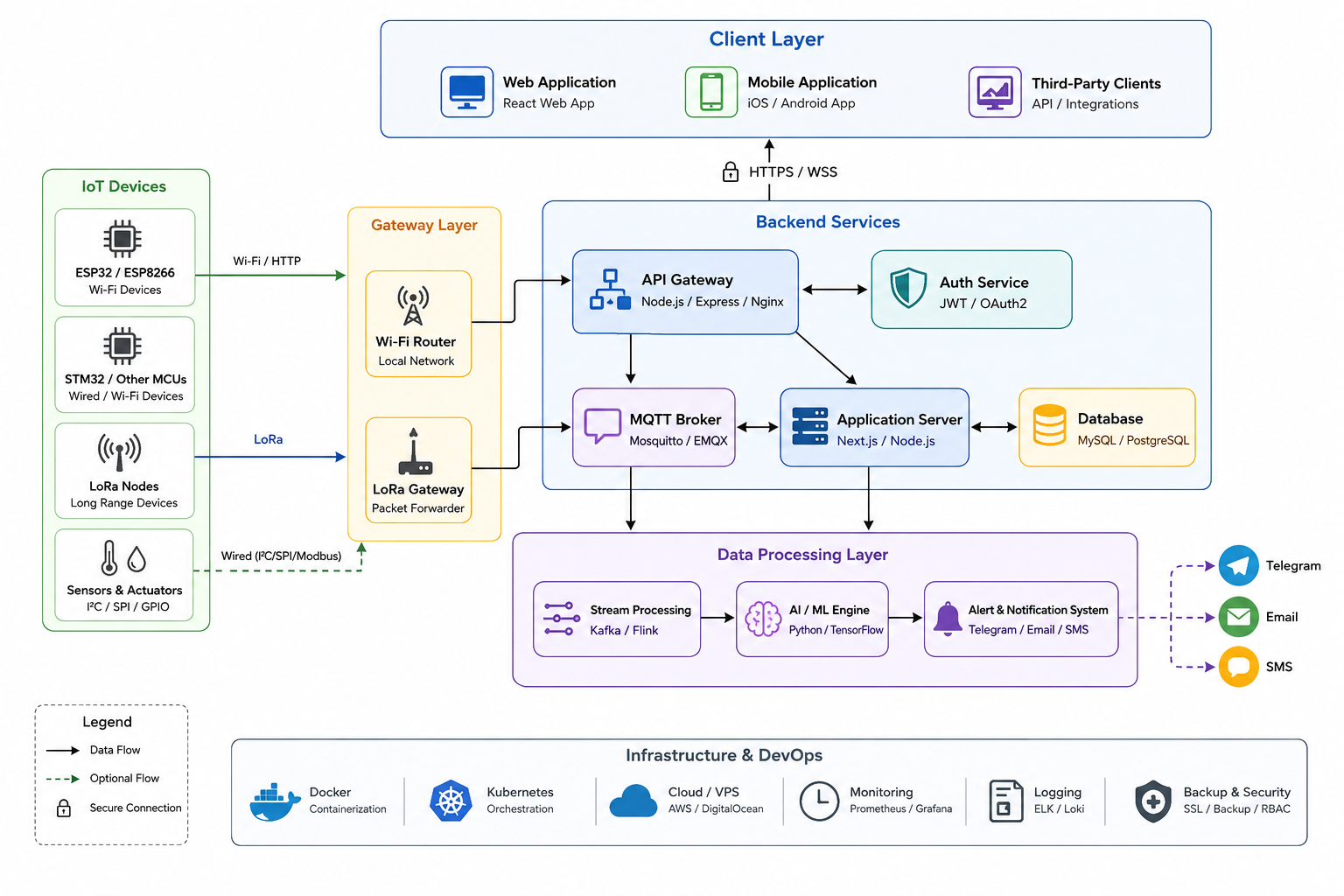
System Architecture Diagram
Backend Technology Comparison
| Technology | Advantages | Disadvantages | Best Use Case |
|---|---|---|---|
| Node.js | Asynchronous, event-driven; excellent for I/O-heavy apps; large NPM ecosystem; single language for frontend/backend | Single-threaded; CPU tasks can block event loop | API servers, real-time dashboards, MQTT handling |
| Python (Django/Flask) | Rich data science ecosystem; highly readable; excellent for AI integration | Slower for concurrent connections; more resource-heavy | AI/ML pipelines, data analytics |
| Nginx/Apache | Mature web servers; excellent for static files and reverse proxy | Not application servers | Serving web apps, load balancing, SSL termination |
Authentication Principles
- User Authentication: Email/password login, social login, or enterprise SSO
- Device Authentication: API keys, client certificates, or MQTT username/password
- Authorization: Role-based access control (RBAC) for users and devices
- Hierarchical Structure: Project → Desk → Device for organizing large networks
Part 6: Program Benefits & Features
Core Benefits
Scalable, Real-Time Analytics
- Handle data from thousands of sensors
- Process and visualize data in real-time
- Historical data analysis and pattern recognition
Energy-Efficient Operations
- Optimized for low-power devices
- Efficient data transmission protocols
- Minimal compute resource usage
Flexible Deployment
- Docker-based deployment anywhere
- Cloud or on-premises options
- Modular software architecture
Responsive UI & Secure API
- Mobile-friendly dashboards
- RESTful APIs for integration
- Secure authentication and authorization
Multi-Channel Alerts
- Email, Telegram, WhatsApp, SMS
- Configurable alert thresholds
- Real-time notifications
Live State, Events & Log Journal
- Real-time device status monitoring
- Event tracking and logging
- Audit trails for compliance
Hierarchical Management Structure (N3xar Example)
- Project: Significant unit (building, floor, department)
- Desk: Logical grouping of IoT devices
- Device/Node: Individual IoT devices or sensors
This structure simplifies monitoring, especially with many devices across different locations.
Part 7: Cloud Integration
Blog Link: On-Premise vs. Cloud: Making the Right IoT Deployment Choice
Advantages of Cloud Deployment
- Scalability: Elastic resources for growing device fleets
- Managed Services: No server maintenance or updates
- Global Availability: Access from anywhere
- Pay-as-You-Grow: Cost-effective for startups
- Integration: Easy connection with other cloud services (AI, analytics, etc.)
Advantages of On-Premise (Self-Hosted) Deployment
- Data Sovereignty: Full control over data location and privacy
- No Ongoing Costs: No per-device or data transfer fees
- Security: Complete control over security measures
- Offline Operation: Can function without internet connectivity
- Customization: Full flexibility for specific requirements
Hybrid Approach
Best Practice: Many organizations use a hybrid model—sensitive data stays on-premise, while non-critical data and analytics leverage cloud scalability.
N3xar Implementation:
- Self-hosted Docker deployment option
- Cloud-based data storage and visualization
- Secure API for integration with existing systems
Decision Factors
| Factor | Choose Cloud | Choose On-Premise |
|---|---|---|
| Data Sensitivity | Low to medium | High |
| Budget | Operational expense | Capital expense |
| Technical Expertise | Limited | Available |
| Internet Reliability | Good | Poor |
| Scale | Growing rapidly | Stable |
| Compliance | Standard | Strict |
Part 8: AI Integration
Blog Link: AI Agents for IoT: From Data to Action and Building Predictive Maintenance Systems
8.1 AI Agents for Control and Alerting
Concept: Autonomous programs that monitor data streams and make decisions or send alerts.
N3xar Implementation:
- AI-powered platform analyzes data in real-time
- Translates complex data into clear signals:
- 🟢 Green – All good
- 🟡 Yellow – Pay attention
- 🔴 Red – Act now
- Event detection and notifications
Example Use Cases:
Environmental Monitoring
- Input: Temperature, humidity, pressure sensors
- Action: Alert when thresholds exceeded; activate cooling/heating
Predictive Maintenance
- Input: Vibration, temperature, current draw from machinery
- Action: Predict failures before they occur; schedule maintenance
Security Systems
- Input: Motion sensors, cameras, access controls
- Action: Alert on unauthorized access; trigger lockdown procedures
8.2 Data Aggregation for AI Analysis
Concept: Collecting, filtering, and combining data from multiple nodes into formats AI models can analyze.
Aggregation Architecture:
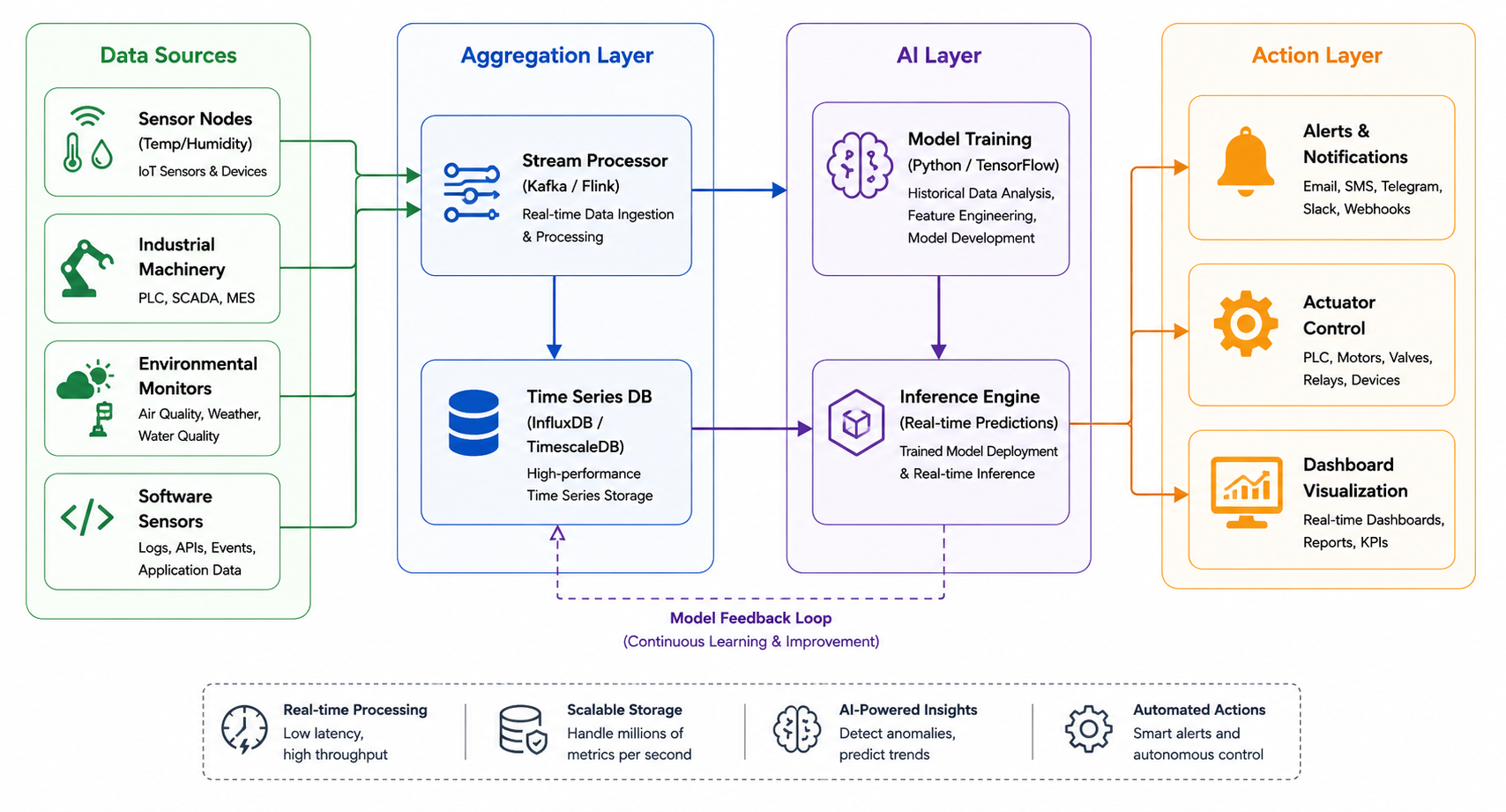
Aggregation Architecture Diagram
Key Capabilities:
- Precision tracking of values over time
- Pattern recognition across devices
- Correlation of events across systems
- Long-term trend analysis
Data Types for Aggregation (N3xar Example):
- Environmental: Temperature, humidity, pressure, light, dust, noise
- Motion: Gyroscopes, speed, acceleration
- Digital: Dry contacts, actuator statuses
- Software: CPU/memory usage, network connectivity, container diagnostics
8.3 AI Integration: Architecture Models
Edge AI
- Model runs on: Local gateway or edge device
- Advantages: Low latency, works offline
- Disadvantages: Limited compute power
- Use Case: Real-time alerts and control
Cloud AI
- Model runs on: Cloud infrastructure
- Advantages: Unlimited compute, complex models
- Disadvantages: Network dependency, higher latency
- Use Case: Complex analysis, training, large-scale pattern recognition
Hybrid AI
- Model runs on: Both edge and cloud
- Advantages: Best of both worlds
- Disadvantages: More complex to manage
- Use Case: Edge for real-time actions, cloud for training and complex analysis
Part 9: Conclusion & Implementation Roadmap
Key Takeaways
-
Architecture Matters: Choose between open/closed systems and distributed/centralized intelligence based on your specific requirements.
-
Device Selection is Critical: Match controllers, sensors, and communication protocols to power, range, and data rate needs.
-
Network Design Impacts Performance: Address collision problems through synchronization or smart scheduling.
-
Server Architecture Determines Scalability: Choose between SaaS, self-hosted, or dedicated deployment based on client needs and data sensitivity.
-
AI Transforms Data into Value: AI agents and aggregated data analysis enable predictive maintenance, automated alerts, and intelligent decision-making.
Recommendations
| Scenario | Recommended Approach |
|---|---|
| Remote, battery-powered sensors | Smart nodes + LoRa + STM32 |
| Building automation with Wi-Fi | Dumb nodes + Smart server + ESP32 |
| Industrial with existing Ethernet | Powered nodes + Wired + Raspberry Pi gateway |
| Multi-site enterprise | Hybrid cloud + Docker deployment |
| High-security government | Dedicated server + On-premise |
Next Steps for Implementation
- Define requirements (data types, frequency, power, range, security)
- Select hardware (controllers, sensors, communication)
- Design network topology (direct, gateway, mesh)
- Choose deployment model (SaaS, self-hosted, dedicated)
- Implement backend (API, database, AI pipeline)
- Develop firmware and frontend
- Test and deploy
- Monitor and iterate
Part 10: Future Blog Article Details
Each section of this article will be expanded into detailed blog posts covering:
Architectural Deep Dives
- “Choosing Between Open and Closed IoT Architectures” — Detailed comparison with real-world case studies
- “Distributed vs. Centralized Intelligence in IoT” — Implementation strategies and trade-offs
Device & Connectivity
- “Comparing IoT Controllers for Your Project” — ESP32, STM32, RP2040, Raspberry Pi deep dive
- “Overview of Wireless Communication Protocols for IoT” — Wi-Fi, LoRa, Cellular, BLE comparison matrix
- “Ultra-Low-Power IoT: Achieving <1µA Sleep Current” — STM32 and other low-power techniques
- “Node-RED vs. Custom Code: An IoT Decision” — Rapid development vs. performance optimization
Network Design
- “IoT Network Design: From Nodes to Cloud” — Complete data flow architecture
- “LoRa vs. Wi-Fi: Choosing the Right Transport” — Detailed protocol comparison
- “Solving the IoT Collision Problem” — Synchronization strategies and implementation
Server & Cloud
- “IoT Backend Architectures: From Prototype to Production” — Scaling strategies
- “Dockerizing Your IoT Stack” — Step-by-step deployment guide
- “Building a Real-Time Dashboard with MQTT and WebSockets” — Frontend implementation
AI & Analytics
- “AI Agents for IoT: From Data to Action” — Building autonomous decision systems
- “Building Predictive Maintenance Systems” — End-to-end AI implementation
- “Time-Series Databases for IoT” — Choosing and using InfluxDB, TimescaleDB
Platform Comparisons
- “Comparing IoT Platforms: N3xar vs. ThingsBoard vs. Datacake” — Feature and deployment comparison
- “MQTT vs. HTTPS: A Performance Comparison” — Real-world benchmark results
References
- N3xar IoT Platform: https://n3xar.com — Full-stack IoT solution with AI analytics, Docker deployment, and multi-channel alerts
- What We Do: Data visualization, historical analysis, event detection
- Technology Stack: Wi-Fi and LoRa principles, hardware-agnostic design
- Program Benefits: Hierarchical management, real-time monitoring, multi-channel alerts
- Product Collection: Wi-Fi and LoRa devices, sensor types, power specifications