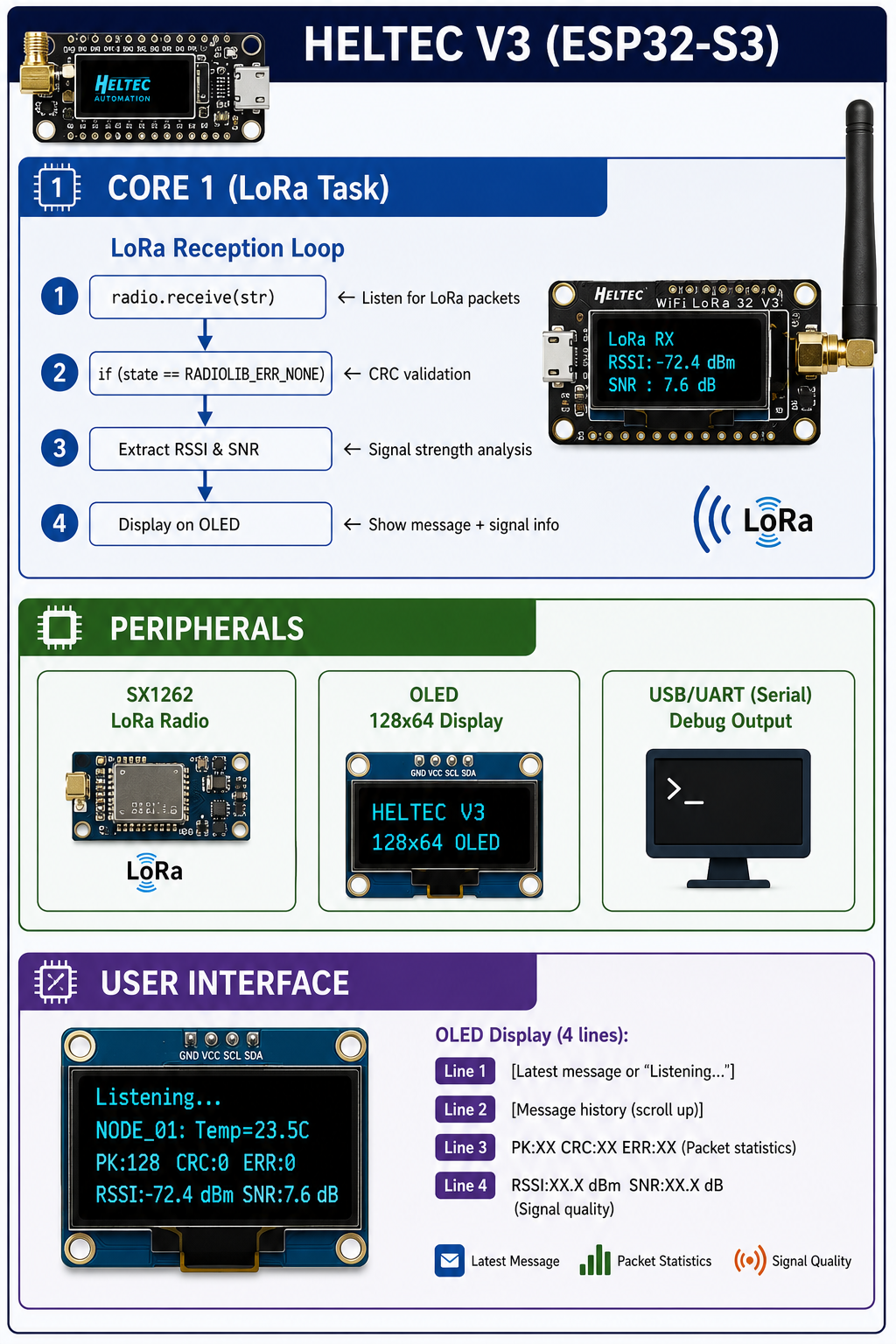
Heltec V3 – LoRa Receiver with OLED Display
A comprehensive guide to building a production-ready LoRa receiver on the Heltec V3 (ESP32-S3) with SX1262 radio, 128x64 OLED display, and real-time signal monitoring (RSSI/SNR).
Overview
The Heltec WiFi LoRa 32 V3 is a powerful development board based on the ESP32-S3, featuring:
- ESP32-S3 – Dual-core Xtensa LX7 processor with Wi-Fi and Bluetooth 5 LE.
- SX1262 – Sub-GHz LoRa transceiver with exceptional sensitivity.
- 128x64 OLED display – Onboard 0.96-inch display for debugging and visualisation.
- USB-C – Modern connectivity with CP2102 USB-serial chip.
- LiPo charging circuit – Built-in battery management for portable applications.
This project transforms the Heltec V3 into a reliable LoRa receiver that:
- ✅ Listens continuously – Captures LoRa packets on a specified frequency.
- ✅ Validates CRC – Only processes packets with correct checksums.
- ✅ Displays real-time data – Shows messages, RSSI, and SNR on the OLED.
- ✅ Logs to serial – Provides detailed debugging output.
- ✅ Handles errors gracefully – Tracks CRC mismatches and other errors.
Architecture
Components & Configuration
Hardware Specifications
| Component | Specification |
|---|
| MCU | ESP32-S3 (Xtensa LX7, 240MHz, dual-core) |
| LoRa Radio | Semtech SX1262 |
| Frequency Range | 863-928 MHz (868/915 MHz versions) |
| Display | 0.96” 128x64 OLED (SSD1306) |
| Memory | 512KB SRAM, 8MB SPI Flash |
| USB | USB-C with CP2102 serial chip |
| Power | 3.7V LiPo charging circuit |
LoRa Parameters
| Parameter | Value | Description |
|---|
| Frequency | 434.65 MHz | Configurable (868/915 MHz for EU/US) |
| Spreading Factor | 12 | Higher SF = longer range, slower data |
| Coding Rate | 5 | Forward error correction (4/5) |
| Sync Word | 0x12 | Prevents interference from other networks |
| Bandwidth | 125.0 kHz | Standard LoRa bandwidth |
| Transmit Power | 17 dBm | Maximum output power |
Complete Code
1. Receiver Code (main.ino)
// Turns the 'PRG' button into the power button, long press is off
#define HELTEC_POWER_BUTTON   // must be before "#include <heltec_unofficial.h>"
#include <heltec_unofficial.h>

// ─── LoRa Configuration ──────────────────────────────────────────────────────
#define LORA_FREQ        434.65     // MHz
#define SPREADING_FACTOR 12
#define CODING_RATE      5
#define SYNC_WORD        0x12
#define BANDWIDTH        125.0      // kHz
#define TRANSMIT_POWER   17         // dBm

// ─── Display Configuration ──────────────────────────────────────────────────
const int FILLER_LENGTH = 16;       // Characters per line

// ─── Message Buffer (4 lines, scrollable) ──────────────────────────────────
String messageBuffer[4];

// ─── Reception Statistics ──────────────────────────────────────────────────
unsigned long receivedPackets = 0;
unsigned long crcErrors = 0;
unsigned long otherErrors = 0;
float averageRSSI = 0;
float averageSNR = 0;

// ─── Helper Functions ──────────────────────────────────────────────────────

String createFillerString() {
    return String(FILLER_LENGTH, '-');
}

void displayMessage(const char* msg) {
    // Shift all lines up (scroll)
    for (int i = 0; i < 3; i++) {
        messageBuffer[i] = messageBuffer[i + 1];
    }

    // Add new message at bottom
    if (msg && strlen(msg) > 0) {
        String displayMsg = String(msg);
        if (displayMsg.length() > FILLER_LENGTH) {
            displayMsg = displayMsg.substring(0, FILLER_LENGTH - 3) + "...";
        }
        messageBuffer[3] = displayMsg;
    } else {
        messageBuffer[3] = createFillerString();
    }

    // Update display
    display.clear();
    for (int i = 0; i < 4; i++) {
        display.drawString(0, i * 16, messageBuffer[i]);
    }
    display.display();
}

void displayStatus() {
    char statusMsg[32];
    snprintf(statusMsg, sizeof(statusMsg), "PK:%lu CRC:%lu ERR:%lu",
             receivedPackets, crcErrors, otherErrors);

    display.drawString(0, 32, statusMsg);

    if (receivedPackets > 0) {
        char signalMsg[32];
        snprintf(signalMsg, sizeof(signalMsg), "RSSI:%.1f SNR:%.1f",
                 averageRSSI, averageSNR);
        display.drawString(0, 48, signalMsg);
    }

    display.display();
}

// ─── Setup ──────────────────────────────────────────────────────────────────

void setup() {
    heltec_setup();          // Initialize Heltec board
    heltec_ve(true);         // Enable verbose error messages
    delay(100);

    // Configure display
    display.setBrightness(255);
    display.clear();
    display.setFont(ArialMT_Plain_16);
    display.setTextAlignment(TEXT_ALIGN_LEFT);
    display.setColor(WHITE);

    // Initialise message buffer
    for (int i = 0; i < 4; i++) {
        messageBuffer[i] = createFillerString();
    }
    displayMessage("Initializing...");

    // Start serial debug
    Serial.begin(115200);
    heltec_delay(200);

    // ─── Initialize LoRa Radio ────────────────────────────────────────────────
    RADIOLIB_OR_HALT(radio.begin());
    displayMessage("Radio init...");

    // Set LoRa parameters
    RADIOLIB_OR_HALT(radio.setFrequency(LORA_FREQ));
    RADIOLIB_OR_HALT(radio.setBandwidth(BANDWIDTH));
    RADIOLIB_OR_HALT(radio.setSpreadingFactor(SPREADING_FACTOR));
    RADIOLIB_OR_HALT(radio.setCodingRate(CODING_RATE));
    RADIOLIB_OR_HALT(radio.setSyncWord(SYNC_WORD));
    RADIOLIB_OR_HALT(radio.setOutputPower(TRANSMIT_POWER));

    // ✅ Heltec V3 hardware-specific configuration
    radio.setRfSwitchPins(0, 44);   // RF switch control pins
    radio.setTCXO(1.8);              // TCXO voltage

    displayMessage("Listening...");
    Serial.println("LoRa Receiver Ready!");
}

// ─── Main Loop ──────────────────────────────────────────────────────────────

void loop() {
    String str;
    int state = radio.receive(str);

    if (state == RADIOLIB_ERR_NONE) {
        // ✅ Packet received successfully
        receivedPackets++;

        // Extract signal metrics
        float rssi = radio.getRSSI();
        float snr = radio.getSNR();

        // Update running averages
        averageRSSI = ((averageRSSI * (receivedPackets - 1)) + rssi) / receivedPackets;
        averageSNR = ((averageSNR * (receivedPackets - 1)) + snr) / receivedPackets;

        // Log to serial
        Serial.print("[RX ok] ");
        Serial.print(str);
        Serial.print(" | RSSI: ");
        Serial.print(rssi);
        Serial.print(" dBm | SNR: ");
        Serial.print(snr);
        Serial.println(" dB");

        // Update display
        displayMessage(str.c_str());

    } else if (state == RADIOLIB_ERR_CRC_MISMATCH) {
        // ❌ CRC mismatch – packet corrupted
        crcErrors++;
        Serial.println("[CRC ERROR]");
        displayMessage("CRC ERROR");

    } else if (state != RADIOLIB_ERR_RX_TIMEOUT) {
        // ❌ Other error (timeout is expected, ignore)
        otherErrors++;
        Serial.print("[RX error] Code: ");
        Serial.println(state);
        displayMessage("RX ERROR");
    }

    heltec_loop();
    heltec_delay(50);
}
Key Features Explained
The display provides real-time feedback:
| Line | Content |
|---|
| Line 1 | Latest received message (or “Listening…”) |
| Line 2 | Previous message (scrolling history) |
| Line 3 | Packet statistics: PK:XX CRC:XX ERR:XX |
| Line 4 | Signal quality: RSSI:XX.X dBm SNR:XX.X dB |
2. CRC Validation
Only packets with correct CRC checksums are displayed and logged. CRC errors are counted separately, allowing you to assess link quality.
- RSSI (Received Signal Strength Indicator) – Measures signal strength in dBm.
- SNR (Signal-to-Noise Ratio) – Indicates signal quality relative to noise.
- Running averages are calculated for stable monitoring.
4. Error Handling
| Error Type | Handling |
|---|
| CRC Mismatch | Counted, displayed on OLED, ignored |
| Timeout | Ignored (normal when no signal) |
| Other Errors | Counted, displayed, logged |
Installation & Setup
1. Install Required Libraries
2. Board Selection
In the Arduino IDE:
Tools → Board → Heltec ESP32 (esp32) → Heltec WiFi LoRa 32(V3)
3. Upload the Code
- Open the sketch in Arduino IDE.
- Select the correct port.
- Click Upload.
4. Verify Operation
- Open the Serial Monitor at 115200 baud.
- You should see:
LoRa Receiver Ready!
- The OLED will display
Listening....
Configuring for Your Region
| Region | Frequency | Notes |
|---|
| Europe | 868 MHz | ETSI compliant |
| North America | 915 MHz | FCC compliant |
| Asia (China) | 470-510 MHz | HTIT-WB32LAF version |
| Custom | 433 MHz | Unlicensed in some regions |
Change the frequency in the code:
#define LORA_FREQ 868.0  // Europe
// #define LORA_FREQ 915.0  // North America
// #define LORA_FREQ 433.0  // Custom
Troubleshooting
Issue: No Packets Received
| Check | Action |
|---|
| Frequency | Ensure transmitter and receiver use the same frequency. |
| Spreading Factor | Both devices must use the same SF. |
| Sync Word | Must match on both ends. |
| Antenna | Ensure antenna is connected. |
| Range | Start with devices close together. |
Issue: CRC Errors
| Cause | Solution |
|---|
| Interference | Try a different frequency or channel. |
| Distance | Move devices closer together. |
| Antenna | Use a tuned antenna for your frequency. |
| Bandwidth | Try wider bandwidth (250 kHz). |
Issue: OLED Not Displaying
| Check | Action |
|---|
| I2C Address | Default is 0x3C; verify in library. |
| Power | Ensure board is powered correctly. |
| Brightness | Check display.setBrightness(255). |
Key Achievements
- ✅ Production-ready LoRa receiver – Stable and reliable.
- ✅ Real-time OLED display – Shows messages and signal metrics.
- ✅ CRC validation – Only processes valid packets.
- ✅ Error tracking – Counts CRC mismatches and other errors.
- ✅ RSSI/SNR monitoring – Running averages for link quality assessment.
- ✅ Dual-core ready – Can be extended to FreeRTOS tasks.
Technology Stack
| Category | Technology |
|---|
| MCU | ESP32-S3 (Heltec V3) |
| LoRa Radio | SX1262 |
| Library | heltec_unofficial.h, RadioLib |
| Display | SSD1306 (128x64 OLED) |
| Frequency | 434.65 MHz (configurable) |
| Modulation | LoRa (Chirp Spread Spectrum) |
This LoRa receiver is part of my broader Embedded Systems Engineering practice. For a detailed technical walkthrough or custom LoRa design, feel free to reach out.