Embedded Systems – Orange Pi One Automation Platform
Complete automation platform on Orange Pi One – GPIO control, internet monitoring, relay automation, and Telegram-based alerting.
Overview
The Orange Pi One is a cost-effective ARM single-board computer that offers a compelling alternative to the Raspberry Pi. I’ve built a complete automation platform on this hardware, integrating:
- GPIO control – LED flashing, relay switching, sensor reading.
- Internet monitoring – Automated connectivity checks.
- Telegram integration – Instant notifications for state changes.
- Hardware automation – Internet outage detection triggering relay resets.
The entire system runs on Armbian (Debian-based) with Python scripts for control logic and Telegram for user notifications.
Architecture
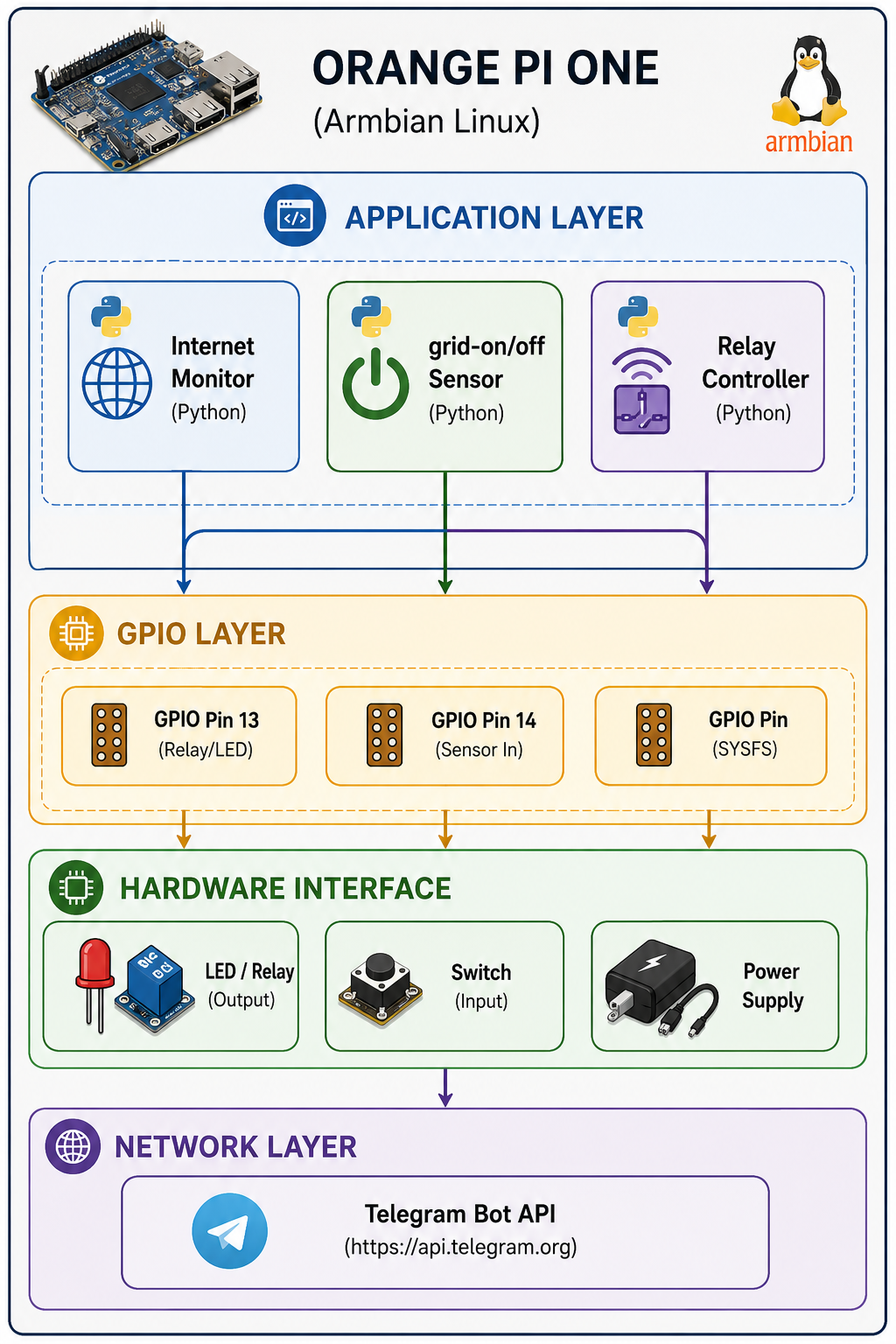
Getting Started
System Setup
1. Operating System: Armbian
The Orange Pi One runs Armbian, a Debian-based Linux distribution optimised for ARM boards:
# Download Armbian for Orange Pi One
https://www.armbian.com/orange-pi-one/

# Flash to SD card using balenaEtcher (or Raspberry Pi Imager)
2. First Boot
Default credentials:
Username: root
Password: 1234
After first login, create a user:
# Create user
adduser user1
usermod -aG sudo user1

# Test SSH
ssh user1@192.168.0.xxx
3. Static IP Configuration
# /etc/network/interfaces
auto end0
iface end0 inet static
  address 192.168.0.121
  netmask 255.255.255.0
  gateway 192.168.0.1
  dns-nameservers 192.168.0.1 8.8.8.8 4.4.4.4
⚠️ Important Note: The Orange Pi One does not support power over microUSB – use the GPIO pins or a dedicated power supply.
GPIO Fundamentals
Pin Mapping
The Orange Pi One uses the H3 processor with a specific GPIO mapping. The Raspberry Pi GPIO library does NOT work – you must use the sysfs interface.
| GPIO Number (sysfs) | Physical Pin | Function |
|---|---|---|
| 0 | PA0 | GPIO Input/Output |
| 1 | PA1 | GPIO Input/Output |
| 12 | PA11 | GPIO Input/Output |
| 13 | PA13 | GPIO Input/Output |
| 14 | PA14 | GPIO Input/Output |

GPIO Control via sysfs
The sysfs interface provides a standard way to control GPIO pins on Linux systems, without requiring custom libraries:
import time
import os

GPIO_PIN = 13  # PA13

# Export the GPIO pin
with open('/sys/class/gpio/export', 'w') as f:
    f.write(str(GPIO_PIN))

# Set as output
with open('/sys/class/gpio/gpio' + str(GPIO_PIN) + '/direction', 'w') as f:
    f.write('out')

# Write value
with open('/sys/class/gpio/gpio' + str(GPIO_PIN) + '/value', 'w') as f:
    f.write('1')  # High / ON

# Read value
with open('/sys/class/gpio/gpio' + str(GPIO_PIN) + '/value', 'r') as f:
    value = f.read().strip()
Clean up after use:
# Unexport the GPIO pin
with open('/sys/class/gpio/unexport', 'w') as f:
    f.write(str(GPIO_PIN))
Example Projects
1. LED Blinker (Output)
A simple LED blinking script:
import time
import os

GPIO_PIN = 13

# Export
with open('/sys/class/gpio/export', 'w') as f:
    f.write(str(GPIO_PIN))

# Set as output
with open('/sys/class/gpio/gpio' + str(GPIO_PIN) + '/direction', 'w') as f:
    f.write('out')

try:
    while True:
        # LED ON
        with open('/sys/class/gpio/gpio' + str(GPIO_PIN) + '/value', 'w') as f:
            f.write('1')
        print("LED on")
        time.sleep(0.5)

        # LED OFF
        with open('/sys/class/gpio/gpio' + str(GPIO_PIN) + '/value', 'w') as f:
            f.write('0')
        print("LED off")
        time.sleep(0.5)

except KeyboardInterrupt:
    with open('/sys/class/gpio/unexport', 'w') as f:
        f.write(str(GPIO_PIN))
2. Internet Monitoring with Relay Reset
This script monitors internet connectivity and triggers a relay reset when the connection fails:
import time
import os
import requests

GPIO_PIN = 13
time_loop = 600  # 10 minutes
time_relay_off_delay = 10  # seconds

def init_relay_GPIO():
    with open('/sys/class/gpio/export', 'w') as f:
        f.write(str(GPIO_PIN))
    with open('/sys/class/gpio/gpio' + str(GPIO_PIN) + '/direction', 'w') as f:
        f.write('out')

def check_internet():
    try:
        response = requests.head('https://www.google.com', timeout=5)
        return response.status_code == 200
    except requests.ConnectionError:
        return False

def relay_flash():
    # Turn relay ON (power cycle)
    with open('/sys/class/gpio/gpio' + str(GPIO_PIN) + '/value', 'w') as f:
        f.write('1')
    print("Relay ON - Power OFF")
    time.sleep(time_relay_off_delay)

    # Turn relay OFF (restore power)
    with open('/sys/class/gpio/gpio' + str(GPIO_PIN) + '/value', 'w') as f:
        f.write('0')
    print("Relay OFF - Power ON")

try:
    init_relay_GPIO()

    while True:
        if check_internet():
            print("Internet connection available")
        else:
            print("No internet connection - Resetting...")
            relay_flash()
        time.sleep(time_loop)

except KeyboardInterrupt:
    with open('/sys/class/gpio/unexport', 'w') as f:
        f.write(str(GPIO_PIN))
3. Grid Monitoring with Telegram Alerts
This script monitors grid-on/off availability and sends notifications via Telegram:
import time
import os
import subprocess

GPIO_PIN = 14  # Input pin for grid-on/off sensor
time_loop = 1  # seconds
state_grid = "init"

child_tx_message = ["python3", "/home/user/telegram_sender.py"]

# Export GPIO
with open('/sys/class/gpio/export', 'w') as f:
    f.write(str(GPIO_PIN))

# Set as input
with open('/sys/class/gpio/gpio' + str(GPIO_PIN) + '/direction', 'w') as f:
    f.write('in')

try:
    while True:
        # Read sensor value
        with open('/sys/class/gpio/gpio' + str(GPIO_PIN) + '/value', 'r') as f:
            value = f.read().strip()

        if value == '1':
            state = "grid-on"
            if state_grid != state:
                state_grid = state
                subprocess.call(child_tx_message + [state])
        else:
            state = "grid-off"
            if state_grid != state:
                state_grid = state
                subprocess.call(child_tx_message + [state])

        time.sleep(time_loop)

except KeyboardInterrupt:
    with open('/sys/class/gpio/unexport', 'w') as f:
        f.write(str(GPIO_PIN))
4. Telegram Sender
A reusable script to send Telegram notifications:
import http.client
import sys

if __name__ == "__main__":
    if len(sys.argv) > 1:
        tx_str = sys.argv[1]

print("Sending:", tx_str)

conn = http.client.HTTPSConnection("api.telegram.org")

token = "YOUR_BOT_TOKEN"
chatID = "YOUR_CHAT_ID"
message = tx_str

payload = (f"-----011000010111000001101001\r\n"
           f"Content-Disposition: form-data; name=\"chat_id\"\r\n\r\n"
           f"{chatID}\r\n"
           f"-----011000010111000001101001\r\n"
           f"Content-Disposition: form-data; name=\"text\"\r\n\r\n"
           f"{message}\r\n"
           f"-----011000010111000001101001--\r\n")

headers = {
    'Content-Type': "multipart/form-data; boundary=---011000010111000001101001",
    'Accept': "application/json"
}

conn.request("POST", f"/bot{token}/sendMessage", payload, headers)
res = conn.getresponse()
print(res.read().decode("utf-8"))
Script Summary
| Script | Function | GPIO | Notes |
|---|---|---|---|
02_flash_light.py | LED Blinker | Output (13) | Simple LED control |
03_check_internet.py | Internet Check | None | Connectivity monitor |
04_internet_check_automat.py | Internet + Relay | Output (13) | Reset on failure |
05_telegram_sender.py | Telegram Notification | None | Messaging utility |
06_electricity_sensor.py | Electricity Monitor | Input (14) | Basic sensor reading |
21_electricity_sensor_main.py | Electricity + Telegram | Input (14) | State change alerts |
22_telegram_sender_electro_params.py | Telegram Sender (params) | None | Dynamic messaging |
31_internet_check_automat.py | Internet Monitor (10min) | Output (13) | Long-interval reset |
Key Achievements
- Complete automation platform on Orange Pi One.
- Reliable GPIO control via sysfs (no external libraries required).
- Internet monitoring with automatic relay reset on failure.
- Grid-on/off monitoring with instant Telegram notifications.
- Production-tested – running 24/7 in a live environment.
- Zero dependencies – all scripts use only Python standard libraries.
Technology Stack
| Category | Technology |
|---|---|
| Hardware | Orange Pi One (Allwinner H3) |
| OS | Armbian (Debian-based) |
| GPIO Control | Linux sysfs interface |
| Language | Python 3 |
| Notifications | Telegram Bot API |
| Network | Static IP, requests library |
| Power | GPIO pins (microUSB not supported) |
Related Projects
- Embedded Systems Engineering – Main embedded systems page.
- Embedded Systems – Docker-Powered Development Environment – Development environment.
- Scalable IoT Systems – IoT platform integration.
This Orange Pi automation platform is part of my broader Embedded Systems Engineering practice. For a detailed technical walkthrough or custom automation design, feel free to reach out.