Raspberry Pi – Hotspot Music Server with GPIO Controls
Complete embedded music system on Raspberry Pi – WiFi hotspot with web interface, MP3 player with file management, GPIO button controls, and systemd auto-start.
Overview
This project transforms a Raspberry Pi into a self-contained music server with:
- WiFi Hotspot – Access the music player from any device without external internet.
- Web Interface – Full music library management (play, download, upload, rename, delete).
- GPIO Hardware Buttons – Physical controls for playback (play/pause, next, prev, volume).
- File Management – Upload, delete, rename, and organize MP3 files.
- Auto-start – Everything starts automatically on boot using systemd.
The system is built on Raspberry Pi OS (Bookworm) with Python, Flask, and MPlayer.
Architecture
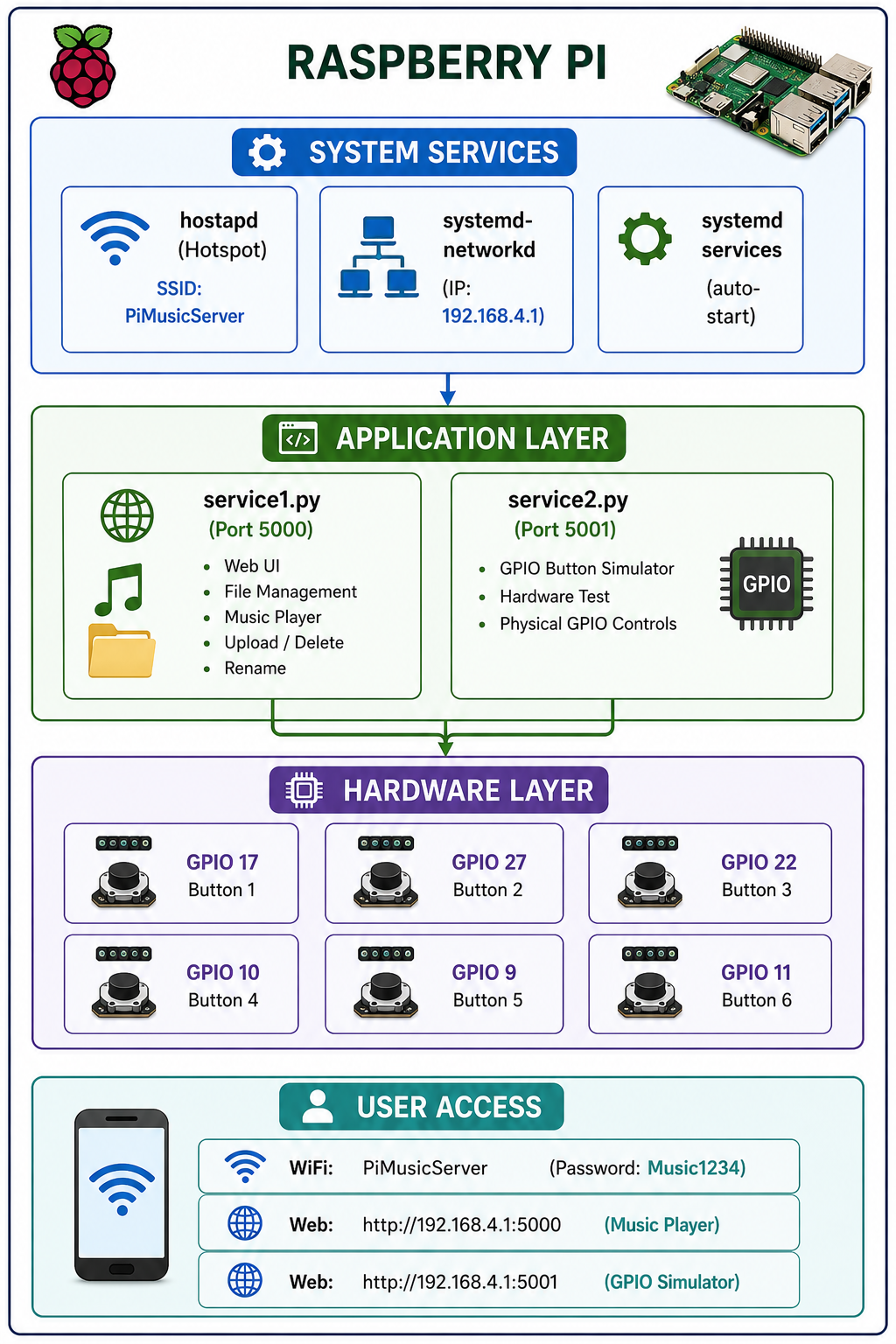
Components
| Component | Purpose |
|---|---|
| Raspberry Pi | Any model with GPIO and WiFi (tested on Pi 3/4/Zero 2 W). |
| Raspberry Pi OS | Bookworm (Debian 12) with Python 3.11+ |
| Hostapd + Dnsmasq | WiFi hotspot (PiMusicServer). |
| Systemd-networkd | Static IP for wlan0. |
| Python + Flask | Web interface and GPIO control. |
| MPlayer | Command-line audio player. |
| GPIO Buttons | Six physical buttons for track selection. |
Quick Start
Step 1: Flash Raspberry Pi OS
# Download Raspberry Pi OS Bookworm
# Flash to SD card using Raspberry Pi Imager
# Enable SSH with the imager (or add empty 'ssh' file to boot partition)
Step 2: Initial Setup
# Update system
sudo apt update
sudo apt upgrade -y

# Install Python and tools
sudo apt install -y python3 python3-pip python3-venv python3-flask python3-flask-cors

# Install MPlayer (audio playback)
sudo apt install -y mplayer

# Install GPIO tools
sudo apt install -y python3-gpiod gpiod

# Install system dependencies
sudo apt install -y hostapd dnsmasq systemd-networkd
WiFi Hotspot Configuration
Network Configuration
# Stop services
sudo systemctl stop hostapd
sudo systemctl stop wpa_supplicant
sudo systemctl stop dnsmasq

# Disable wpa_supplicant
sudo systemctl disable wpa_supplicant
sudo systemctl mask wpa_supplicant
systemd-networkd Configuration
sudo nano /etc/systemd/network/08-wlan0.network[Match]
Name=wlan0
[Network]
Address=192.168.4.1/24
DHCPServer=yes
IPMasquerade=yeshostapd Configuration
sudo nano /etc/hostapd/hostapd.confinterface=wlan0
driver=nl80211
ssid=PiMusicServer
hw_mode=g
channel=7
wpa=2
wpa_passphrase=Music1234
wpa_key_mgmt=WPA-PSK
rsn_pairwise=CCMPEnable Services
# Configure hostapd
echo 'DAEMON_CONF="/etc/hostapd/hostapd.conf"' | sudo tee /etc/default/hostapd

# Enable IP forwarding
echo "net.ipv4.ip_forward=1" | sudo tee /etc/sysctl.d/99-hotspot.conf
sudo sysctl --system

# Enable services
sudo systemctl unmask hostapd
sudo systemctl enable hostapd
sudo systemctl enable systemd-networkd
sudo systemctl restart systemd-networkd
sudo systemctl start hostapd
Create Service for wlan0 (Reboot Persistence)
sudo nano /etc/systemd/system/hostapd-wlan0.service[Unit]
Description=Hostapd with wlan0 ready
Wants=network.target
After=network.target
[Service]
Type=simple
ExecStartPre=/bin/sleep 5
ExecStart=/usr/sbin/hostapd /etc/hostapd/hostapd.conf
Restart=always
[Install]
WantedBy=multi-user.targetsudo systemctl disable hostapd
sudo systemctl stop hostapd
sudo systemctl daemon-reload
sudo systemctl enable hostapd-wlan0.service
sudo systemctl start hostapd-wlan0.serviceMusic Server Setup
Project Structure
/home/test/music-server/
├── service1.py          # Web interface (Port 5000)
├── service2.py          # GPIO simulator (Port 5001)
├── requirements.txt     # Python dependencies
├── templates/
│   ├── service1.html    # Music player UI
│   └── service2.html    # GPIO simulator UI
├── static/
│   ├── music/           # MP3 files (uploaded here)
│   └── uploads/         # Temporary uploads
└── venv/                # Python virtual environment
Create Project Directory
# Create user test (if not exists)
sudo useradd -m -s /bin/bash test
sudo passwd test  # Set password

# Switch to test user
sudo su - test

# Create project structure
mkdir -p ~/music-server/{templates,static/music,static/uploads}
cd ~/music-server

# Create virtual environment
python3 -m venv venv
source venv/bin/activate
requirements.txt
Flask==2.3.3
Flask-CORS==4.0.0
Werkzeug==2.3.7
RPi.GPIO==0.7.1
pip install -r requirements.txtService Files
service1.py – Web Interface & File Manager
#!/usr/bin/env python3
from flask import Flask, render_template, jsonify, send_file, send_from_directory, request
from werkzeug.utils import secure_filename
import os
import json
import threading
import time
from pathlib import Path
import shutil

try:
    import RPi.GPIO as GPIO
    GPIO_AVAILABLE = True
except ImportError:
    GPIO_AVAILABLE = False
    print("GPIO running in simulation mode")

app = Flask(__name__)
app.config['MAX_CONTENT_LENGTH'] = 100 * 1024 * 1024  # 100MB max upload

# Define paths
BASE_DIR = Path(__file__).parent
MUSIC_FOLDER = BASE_DIR / 'static' / 'music'
UPLOAD_FOLDER = BASE_DIR / 'static' / 'uploads'
TEMPLATE_FOLDER = BASE_DIR / 'templates'

# Create directories if they don't exist
MUSIC_FOLDER.mkdir(parents=True, exist_ok=True)
UPLOAD_FOLDER.mkdir(parents=True, exist_ok=True)
TEMPLATE_FOLDER.mkdir(parents=True, exist_ok=True)

# Allowed file extensions
ALLOWED_EXTENSIONS = {'mp3', 'wav', 'ogg', 'flac', 'm4a'}

# GPIO Setup (customizable pins)
BUTTON_PINS = {
    'play_pause': 5,  # GPIO 5 (Pin 29)
    'next': 6,        # GPIO 6 (Pin 31)
    'prev': 16,       # GPIO 16 (Pin 36)
    'vol_up': 25      # GPIO 25 (Pin 22)
}

player_state = {
    'playing': False,
    'current_song': None,
    'volume': 0.5,
    'gpio_available': GPIO_AVAILABLE
}

def allowed_file(filename):
    return '.' in filename and filename.rsplit('.', 1)[1].lower() in ALLOWED_EXTENSIONS

def get_file_size(filename):
    """Get human readable file size"""
    path = MUSIC_FOLDER / filename
    if path.exists():
        size = path.stat().st_size
        for unit in ['B', 'KB', 'MB', 'GB']:
            if size < 1024.0:
                return f"{size:.1f} {unit}"
            size /= 1024.0
    return "0 B"

def setup_gpio():
    if GPIO_AVAILABLE:
        GPIO.setmode(GPIO.BCM)
        GPIO.setwarnings(False)
        for pin in BUTTON_PINS.values():
            GPIO.setup(pin, GPIO.IN, pull_up_down=GPIO.PUD_DOWN)
        print("GPIO initialized")
    else:
        print("GPIO simulation mode")

def button_monitor():
    if not GPIO_AVAILABLE:
        return

    button_states = {pin: False for pin in BUTTON_PINS.values()}

    while True:
        try:
            for name, pin in BUTTON_PINS.items():
                current = GPIO.input(pin)
                if current and not button_states[pin]:
                    button_states[pin] = True
                    print(f"GPIO Button pressed: {name} (GPIO{pin})")
                elif not current and button_states[pin]:
                    button_states[pin] = False
        except Exception as e:
            print(f"GPIO error: {e}")
        time.sleep(0.05)

# Routes
@app.route('/')
def index():
    """Main page"""
    return render_template('service1.html', state=player_state)

@app.route('/api/files')
def list_files():
    """List all music files with details"""
    files = []
    for f in MUSIC_FOLDER.iterdir():
        if f.is_file() and f.suffix.lower() in ['.mp3', '.wav', '.ogg', '.flac', '.m4a']:
            stat = f.stat()
            files.append({
                'name': f.name,
                'size': get_file_size(f.name),
                'size_bytes': stat.st_size,
                'modified': stat.st_mtime,
                'url': f'/static/music/{f.name}',
                'download_url': f'/download/{f.name}',
                'delete_url': f'/delete/{f.name}',
                'rename_url': f'/rename/{f.name}'
            })

    files.sort(key=lambda x: x['name'].lower())
    return jsonify(files)

@app.route('/static/music/<path:filename>')
def serve_music(filename):
    """Serve music files for playback"""
    return send_from_directory(MUSIC_FOLDER, filename)

@app.route('/download/<filename>')
def download_file(filename):
    """Download a file"""
    return send_from_directory(MUSIC_FOLDER, filename, as_attachment=True)

@app.route('/delete/<filename>')
def delete_file(filename):
    """Delete a file"""
    try:
        filepath = MUSIC_FOLDER / secure_filename(filename)
        if filepath.exists():
            filepath.unlink()
            return jsonify({'success': True, 'message': f'Deleted {filename}'})
        return jsonify({'success': False, 'message': 'File not found'}), 404
    except Exception as e:
        return jsonify({'success': False, 'message': str(e)}), 500

@app.route('/rename/<old_filename>', methods=['POST'])
def rename_file(old_filename):
    """Rename a file"""
    try:
        data = request.get_json()
        if not data or 'new_name' not in data:
            return jsonify({'success': False, 'message': 'New name required'}), 400

        new_name = secure_filename(data['new_name'])

        if '.' not in new_name:
            old_ext = Path(old_filename).suffix
            new_name = new_name + old_ext

        old_path = MUSIC_FOLDER / secure_filename(old_filename)
        new_path = MUSIC_FOLDER / new_name

        if not old_path.exists():
            return jsonify({'success': False, 'message': 'File not found'}), 404

        if new_path.exists():
            return jsonify({'success': False, 'message': 'File with new name already exists'}), 400

        old_path.rename(new_path)

        if player_state['current_song'] == old_filename:
            player_state['current_song'] = new_name

        return jsonify({
            'success': True,
            'message': f'Renamed {old_filename} to {new_name}',
            'new_name': new_name
        })

    except Exception as e:
        return jsonify({'success': False, 'message': str(e)}), 500

@app.route('/upload', methods=['POST'])
def upload_file():
    """Upload new music files"""
    if 'file' not in request.files:
        return jsonify({'success': False, 'message': 'No file part'}), 400

    file = request.files['file']
    if file.filename == '':
        return jsonify({'success': False, 'message': 'No selected file'}), 400

    if file and allowed_file(file.filename):
        filename = secure_filename(file.filename)
        filepath = MUSIC_FOLDER / filename

        counter = 1
        while filepath.exists():
            name, ext = os.path.splitext(filename)
            filename = f"{name}_{counter}{ext}"
            filepath = MUSIC_FOLDER / filename
            counter += 1

        file.save(filepath)
        return jsonify({
            'success': True,
            'message': f'Uploaded {filename}',
            'filename': filename
        })

    return jsonify({'success': False, 'message': 'File type not allowed'}), 400

@app.route('/play/<filename>')
def play_file(filename):
    """Set current playing file"""
    filepath = MUSIC_FOLDER / secure_filename(filename)
    if filepath.exists():
        player_state['current_song'] = filename
        player_state['playing'] = True
        return jsonify({'success': True, 'message': f'Playing {filename}'})
    return jsonify({'success': False, 'message': 'File not found'}), 404

@app.route('/api/control/<command>')
def control_player(command):
    """Control player"""
    if command == 'play':
        player_state['playing'] = True
    elif command == 'pause':
        player_state['playing'] = False
    elif command == 'next':
        pass
    elif command == 'prev':
        pass

    return jsonify({'success': True, 'state': player_state})

@app.route('/api/status')
def get_status():
    """Get player status"""
    return jsonify(player_state)

@app.route('/storage')
def storage_info():
    """Get storage information"""
    try:
        total, used, free = shutil.disk_usage(MUSIC_FOLDER)
        return jsonify({
            'total': total,
            'used': used,
            'free': free,
            'total_gb': round(total / (1024**3), 2),
            'used_gb': round(used / (1024**3), 2),
            'free_gb': round(free / (1024**3), 2)
        })
    except:
        return jsonify({'error': 'Could not get storage info'}), 500

if __name__ == '__main__':
    setup_gpio()

    if GPIO_AVAILABLE:
        btn_thread = threading.Thread(target=button_monitor, daemon=True)
        btn_thread.start()

    print(f"Music folder: {MUSIC_FOLDER}")
    print(f"Server starting on http://0.0.0.0:5000")
    print(f"GPIO Available: {GPIO_AVAILABLE}")

    app.run(host='0.0.0.0', port=5000, debug=False, threaded=True)
service2.py – GPIO Button Simulator
A second service runs on port 5001 to simulate and test GPIO hardware buttons. See the attached file structure for the complete code (included in the project ZIP).
Systemd Auto-Start Services
service1 Systemd
sudo nano /etc/systemd/system/music-service1.service[Unit]
Description=Music Server Service 1 (Web Interface)
After=network.target hostapd-wlan0.service
[Service]
Type=simple
User=test
WorkingDirectory=/home/test/music-server
ExecStart=/home/test/music-server/venv/bin/python /home/test/music-server/service1.py
Restart=always
RestartSec=10
Environment=PYTHONUNBUFFERED=1
[Install]
WantedBy=multi-user.targetservice2 Systemd
sudo nano /etc/systemd/system/music-service2.service[Unit]
Description=Music Server Service 2 (GPIO Simulator)
After=network.target hostapd-wlan0.service
[Service]
Type=simple
User=test
WorkingDirectory=/home/test/music-server
ExecStart=/home/test/music-server/venv/bin/python /home/test/music-server/service2.py
Restart=always
RestartSec=10
Environment=PYTHONUNBUFFERED=1
[Install]
WantedBy=multi-user.targetEnable Both Services
sudo systemctl daemon-reload
sudo systemctl enable music-service1
sudo systemctl enable music-service2
sudo systemctl start music-service1
sudo systemctl start music-service2

# Check status
sudo systemctl status music-service1
sudo systemctl status music-service2
GPIO Button Wiring
Pin Mapping
| Button | GPIO (BCM) | Physical Pin | Function |
|---|---|---|---|
| 1 | 17 | 11 | Track 1 (001.mp3) |
| 2 | 27 | 13 | Track 2 (002.mp3) |
| 3 | 22 | 15 | Track 3 (003.mp3) |
| 4 | 10 | 19 | Track 4 (004.mp3) |
| 5 | 9 | 21 | Track 5 (005.mp3) |
| 6 | 11 | 23 | Track 6 (006.mp3) |
Wiring Instructions
Button 1: GPIO 17 ──[BTN]── GND
Button 2: GPIO 27 ──[BTN]── GND
Button 3: GPIO 22 ──[BTN]── GND
Button 4: GPIO 10 ──[BTN]── GND
Button 5: GPIO 9  ──[BTN]── GND
Button 6: GPIO 11 ──[BTN]── GND
GND Pins: Use any ground pin (6, 9, 14, 20, 25, 30, 34, 39).
Accessing the Server
| Service | URL | Purpose |
|---|---|---|
| Music Player | http://192.168.4.1:5000 | Web interface with file management |
| GPIO Simulator | http://192.168.4.1:5001 | Hardware test and control |
| SSH | ssh test@192.168.4.1 | Remote access (password: 12345) |
WiFi Details
- SSID:
PiMusicServer - Password:
Music1234
Features
| Feature | Description |
|---|---|
| Play Music | Click any file to play in browser audio player. |
| Upload Files | Drag and drop or click to upload MP3 files. |
| Delete Files | Remove unwanted tracks. |
| Rename Files | Double-click or right-click to rename. |
| Download Files | Download tracks to connected device. |
| GPIO Buttons | Physical buttons on the Raspberry Pi. |
| Keyboard Shortcuts | 1-6 for tracks, S for stop, +/- for volume. |
| Auto-Start | Everything starts on boot. |
Troubleshooting
GPIO Not Working
# Add user to GPIO group
sudo usermod -aG gpio test

# Check GPIO permissions
ls -la /dev/gpio*

# Test GPIO manually
sudo gpioset gpiochip0 17=1
sudo gpioget gpiochip0 17
MPlayer Not Playing
# Check audio device
aplay -l

# Test audio
speaker-test -t sine -f 440 -c 2

# Install MPlayer
sudo apt install mplayer -y
Hotspot Not Starting
# Check status
sudo systemctl status hostapd-wlan0

# Check logs
sudo journalctl -u hostapd-wlan0 -f

# Check interface
ip addr show wlan0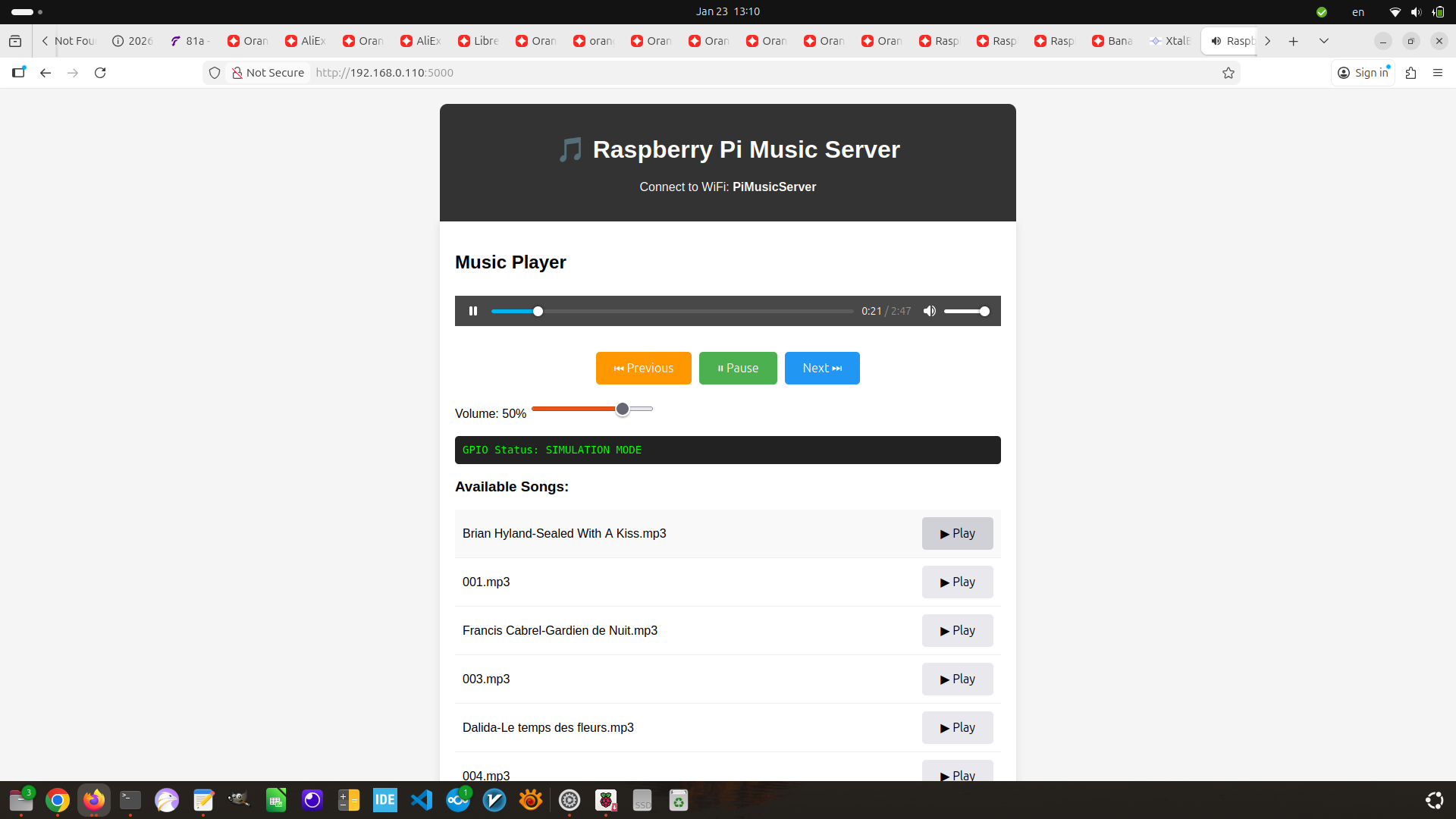
Key Achievements
- ✅ Complete music server with web interface and file management.
- ✅ WiFi hotspot with static IP (192.168.4.1).
- ✅ GPIO hardware controls (6 physical buttons).
- ✅ Dual-service architecture (web UI + GPIO simulator).
- ✅ Auto-start on boot via systemd.
- ✅ File management (upload, delete, rename, download).
- ✅ Drag-and-drop upload with progress bar.
- ✅ Keyboard shortcuts for all controls.
Technology Stack
| Category | Technology |
|---|---|
| Hardware | Raspberry Pi (3/4/Zero 2 W) |
| OS | Raspberry Pi OS Bookworm |
| Hotspot | hostapd + systemd-networkd |
| Web Server | Flask (Python) |
| Audio Player | MPlayer |
| GPIO Control | RPi.GPIO, gpiod |
| Frontend | HTML5, CSS3, JavaScript (Vanilla) |
| File Management | Python os, pathlib, shutil |
Related Projects
- Embedded Systems Engineering – Main embedded systems page.
- Orange Pi One Automation Platform – ARM-based automation.
- Arduino Server-Side Compiler – Docker-based compilation.
This Raspberry Pi music server is part of my broader Embedded Systems Engineering practice. For a detailed technical walkthrough or custom audio project design, feel free to reach out.