MQTT vs HTTPS for IoT: Why 100 ESP-01s Made Me Ditch HTTP
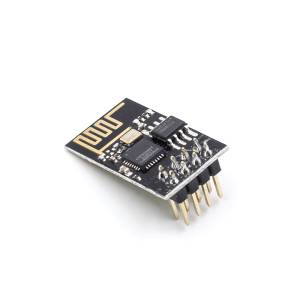
ESP8266 ESP-01
The Setup: Real Hardware, Real Bottleneck
I’m running an IoT stack with 10x ESP-01 controllers, scaling to 100+ sensors. Each sends {temp, hum} data to a Next.js server that writes to MySQL. A web app displays it.
The question: How do we get sensor data from 100+ devices without losing information or choking the gateway?
[ESP-01 x100+] → [Gateway/Server] → [Next.js API] → [MySQL] → [WebApp]
With HTTPS, I hit a wall fast.
HTTPS: Death by a Thousand Handshakes
HTTP wasn’t built for 100 chatty sensors. Each request looks like this:
- TCP + TLS handshake: ~2-3s on ESP-01 with WiFi hiccups
- Send POST, wait for 200 OK: ~2-3s
- Parse response on device: ~1-2s
- Total per message: ~7-9s
Do the math: 60s / 8s avg = 7.5 devices/min per thread. Factor in WiFi collisions and retries, you’re at ~6 devices per minute sustained. With 100 sensors sending every minute, you’d need 17 parallel HTTP connections just to keep up. ESP-01 has 1. RAM dies. Data gets lost.
The core issue: HTTP is request/response. No persistent connection. Every packet pays the TLS tax.
MQTT: Built for This Exact Problem
MQTT is pub/sub over a persistent TCP connection. Connect once, publish forever.
[ESP-01 x100+] → [MQTT Broker: Mosquitto] → [Next.js Server / mqtt_worker] → [MySQL]
No handshake per message. No waiting for 200 OK. Fire-and-forget with QoS options.
Producer Performance: The Numbers Don’t Lie
I benchmarked 100 publishes from the same machine to localhost. Same payload, same network.
| Metric | MQTT | HTTPS | Difference |
|---|---|---|---|
| Total Time for 100 msgs | 14.32ms | 319.79ms | MQTT used 4.5% of HTTP time |
| Avg Time/Message | 0.03ms | 54.66ms | 1822x faster per msg |
| Min Time | 0.01ms | 38.45ms | |
| Max Time | 1.27ms | 83.64ms | More consistent latency |
| Throughput | 6,983 msg/sec | 312 req/sec | 22.3x faster |
| Success Rate | 100% | 100% | Both reliable at this scale |
Performance improvement: 2133%. MQTT was 21.3x faster in throughput.
On an ESP-01, the gap is even wider because TLS handshake dominates. HTTPS 7-9s vs MQTT 50-200ms to publish.
Why MQTT Wins for Sensor Fleets
| Category | MQTT | HTTPS |
|---|---|---|
| Connection | Persistent. Connect once | New TCP+TLS per request |
| Latency | 2-10x faster, consistent | High, variable due to handshake |
| Overhead | 2-byte header min | HTTP headers = 200+ bytes |
| Server Load | Low CPU/RAM. Event-driven | High. Thread per request |
| Scalability | 10k+ clients per broker | Chokes past ~50-100 devices |
| Reliability | QoS 0/1/2. Last Will | Relies on TCP retry only |
| Real-time | Push. Server gets data instantly | Poll. Client decides when |
Conclusion: Yes, MQTT Absolutely Reduces Gateway Delay
Because:
- No waiting: Devices don’t block for HTTP responses
- Persistent: One connection handles thousands of messages
- Lightweight: 2-byte overhead vs 200-byte HTTP headers
- Event-driven: Broker pushes data to server instantly = real-time updates
For 100+ ESP-01s sending every minute, HTTPS means dropped data. MQTT means breathing room.
Step-by-Step Implementation
1. MQTT Broker Docker Service
# docker-compose.yml
version: '3.8'
services:
  mqtt-broker:
    image: eclipse-mosquitto:latest
    ports:
      - "1883:1883"   # MQTT
      - "9001:9001"   # Websockets
    volumes:
      - ./mosquitto.conf:/mosquitto/config/mosquitto.conf
      - mosquitto_data:/mosquitto/data
      - mosquitto_log:/mosquitto/log

volumes:
  mosquitto_data:
  mosquitto_log:
2. ESP8266 ESP-01 as MQTT Publisher (Producer)
Instead of HTTP POST, configure ESP8266 ESP-01 to publish to MQTT:
// ESP8266 ESP-01 code
#include <PubSubClient.h>
#include <WiFiClient.h>

WiFiClient espClient;
PubSubClient client(espClient);

void setup() {
  client.setServer("example.com", 1883);
}

void loop() {
  if (!client.connected()) {
    reconnect();
  }

  // Publish sensor data to MQTT
  String payload = "{\"sensor\":\"temperature\",\"value\":25.5}";
  client.publish("sensors/data", payload.c_str());

  delay(5000);
}
3. Consumer Service (MQTT to HTTP Bridge)
// consumer-service/index.js
const mqtt = require('mqtt');
const axios = require('axios');

const mqttClient = mqtt.connect('mqtt://mqtt-broker:1883');
const API_URL = 'http://backend:3000/sss/write_data';

mqttClient.on('connect', () => {
  mqttClient.subscribe('sensors/data');
});

mqttClient.on('message', async (topic, message) => {
  try {
    const payload = JSON.parse(message.toString());

    // Forward to your existing backend API
    await axios.post(API_URL, payload);
    console.log('Data forwarded successfully');
  } catch (error) {
    console.error('Forwarding failed:', error);
  }
});
4. Docker Compose (Complete Setup)
version: '3.8'
services:
  # Your existing services
  backend:
    image: your-nodejs-backend:latest
    environment:
      - DB_HOST=mysql
    depends_on:
      - mysql

  mysql:
    image: mysql:8.0
    environment:
      - MYSQL_ROOT_PASSWORD=password
    volumes:
      - mysql_data:/var/lib/mysql

  # New MQTT services
  mqtt-broker:
    image: eclipse-mosquitto:latest
    ports:
      - "1883:1883"
    volumes:
      - ./mosquitto.conf:/mosquitto/config/mosquitto.conf

  mqtt-consumer:
    build: ./consumer-service
    depends_on:
      - mqtt-broker
      - backend

volumes:
  mysql_data:
Benefits of This Architecture
- Better Reliability: MQTT handles poor network conditions better than HTTP
- Lower Power Consumption: MQTT is more efficient for IoT devices
- Scalability: Easy to add more consumers or publishers
- Decoupling: Services are independent and can be scaled separately
Additional Recommendations
-
Security:
- Use MQTT with TLS (
mqtts://) - Implement authentication for MQTT broker
- Use unique topics per device
- Use MQTT with TLS (
-
Error Handling:
- Implement retry logic in consumer service
- Use MQTT QoS levels for message delivery guarantees
- Add dead letter queue for failed messages
-
Monitoring:
- Monitor MQTT broker metrics
- Log successful/failed forward operations
- Set up alerts for service failures
Final Take
HTTPS is for browsers. MQTT is for machines.